 Trackhop

Your playlists,
everywhere.
Trackhop keeps playlists in sync across music services, by hand or on a schedule.
Free and open source. No account, no server, no subscription: everything runs on your phone.





On a computer or a server: Trackhop Desktop and Docker. All downloads
Every download checked on VirusTotalInstalled Trackhop from Google Play? Add Trackhop Bridge for YouTube Music, Amazon Music, and Spotify and Apple Music without developer keys. Which version do I need?
What it does
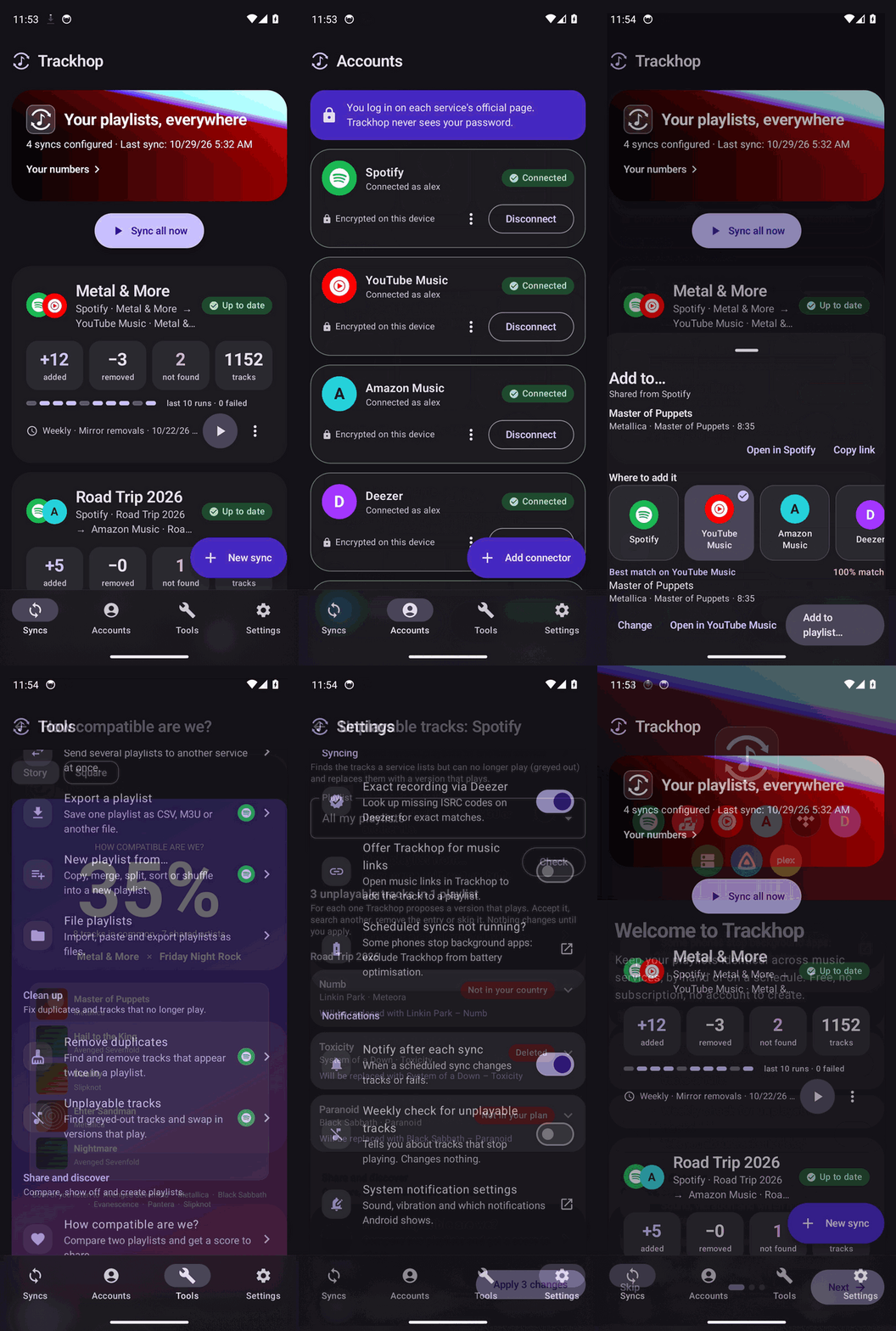
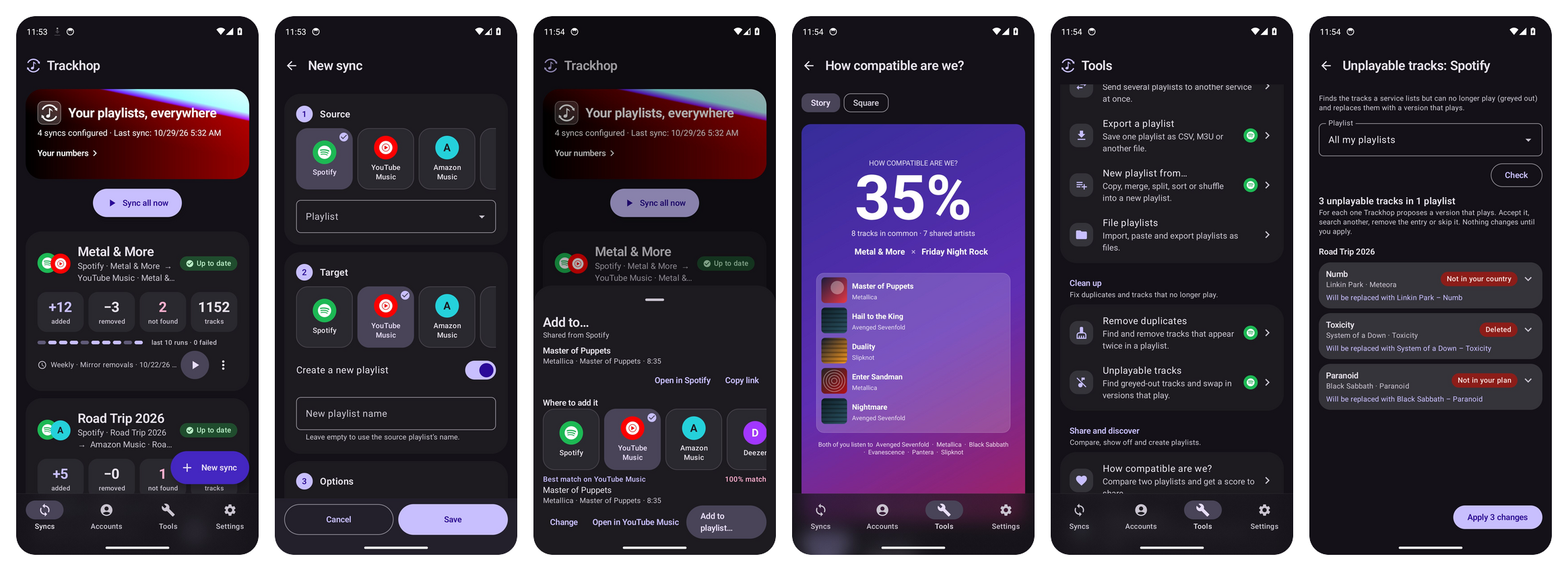
Pick a source and a target, choose how often. Trackhop finds every track on the other side, shows you what will change, and keeps both in step.
Any service to any service
Playlists, liked songs, saved albums and followed artists. Or paste the link of any public playlist.
On a schedule
Hourly, every 6 hours, daily or weekly. Additions only, or mirror removals too, and keep the source's order.
Nothing guessed
A preview before every sync. Tracks that were not found go to a review: pick the right one once, Trackhop remembers it.
Your accounts stay yours
You sign in on each service's own page. Access tokens are encrypted on the phone and never leave it.
Your own music server
Navidrome and other Subsonic servers, Jellyfin and Plex, next to the streaming services. Files too: CSV, M3U, XML, JSON.
Playlist tools
Backups, duplicate removal, merge, split and sort, and a playlist generator driven by your own AI key.
Works with
Services marked beta work and follow each service's documented API, but have had less real-world use: reports are welcome.
Streaming services
Your own server
Sources and files
Why not an online transfer service?
Soundiiz, TuneMyMusic and FreeYourMusic are good at a one-off move. Trackhop is for keeping playlists in step over time, without handing your accounts to anyone. Side by side: Trackhop and Soundiiz, Trackhop and TuneMyMusic.
| Trackhop | Online transfer services | |
|---|---|---|
| Where it runs | On your phone | On their servers |
| Who holds your logins | Only your phone, encrypted | The service |
| Account, subscription | None | Account; limits on the free plan |
| Scheduled sync, removals mirrored | Yes | Mostly paid plans |
| Personal servers | Yes | Rarely |
| Source code | Open, GPL-3.0-only | Closed |
Also on a computer or a NAS
Want to try it without a phone, or keep syncs running on a machine that is always on? The same engine runs on your computer and on a server, with a web page to connect services and create syncs. Both are a beta: they work for everyday use but are still young, so keep a copy of your set-up and tell us what breaks.
Trackhop Desktop beta for Windows, macOS and Linux: install it like any program, no Docker or Java needed, no administrator rights. It sits next to the clock and runs scheduled syncs while the computer is on. Version 0.7.0 (what's in it).
Windows installer Windows, no install (.zip) macOS, Apple silicon macOS, Intel Linux (.deb) Linux (.tar.gz) Linux (Flatpak)
Or with a package manager:
# Windows, from the Microsoft Store
winget install 9PFX74Q2XN9P

# Windows, with Scoop
scoop bucket add xlollx https://github.com/xlollx/scoop-bucket
scoop install xlollx/trackhop

# macOS, with Homebrew
brew install --cask xlollx/tap/trackhop
How to install it · All versions · Microsoft Store · For Windows, Mac, Linux
Docker beta, for a home server, a NAS or a Raspberry Pi:
docker run -d -p 8080:8080 \
  -v trackhop-data:/data \
  -e SONGPORT_PASSWORD=choose-one \
  ghcr.io/xlollx/trackhop
Then open http://127.0.0.1:8080. To update, pull the image and start the container again: your syncs stay in the volume. Settings, Docker Compose and what works there: the Docker guide. Also on Docker Hub as xlollx/trackhop. On a NAS (Synology, Unraid, TrueNAS), or next to Navidrome, Jellyfin or Plex. For the whole household, one account each: everyone signs in and has their own services and syncs.
Both have the app's look, the review of tracks not found, File playlists in every format, and the app's Tools: export, full backups (also on a schedule), duplicates, unplayable tracks, AI playlists and your numbers.
How Trackhop uses your data
Trackhop connects to the music services you choose (Spotify, YouTube Music, Apple Music, Amazon Music, TIDAL, Deezer, personal servers) with each service's own sign-in. It reads your playlists and their tracks, and, when you start or schedule a sync, creates playlists and adds or removes tracks in your own account. For YouTube Music through Google's API this means the YouTube Data API with the youtube permission, used only for your playlists and only on your device.
Access tokens are stored encrypted on the phone and never sent to Trackhop's developer or to any third party. There is no Trackhop server. Details in the privacy policy.
Get started
Android 8.0 or newer, in English, Italian, French, German, Spanish, Portuguese, Polish, Russian, Turkish, Chinese, Japanese and Korean. Not sure which build to take? Which Trackhop? compares them. The guide walks through the first sync and the common errors; if something does not work as described, Settings → Diagnostics → Report an issue opens a report with the details filled in.
Step by step: Spotify to YouTube Music · Apple Music to Spotify · Spotify to TIDAL · Spotify to Navidrome, Jellyfin or Plex · a playlist to CSV or M3U · your Shazams in a playlist.
No Android phone at hand? Try Trackhop Desktop on Windows or Linux, or the Docker version.
Using the Google Play version? Download Trackhop Bridge, the plugin that adds YouTube Music, Amazon Music, and Spotify and Apple Music without developer keys (unofficial web interfaces: read its notes first).
Songport is now Trackhop. Same app, same code, same updates: only the name changed, because an unrelated service called "SongPort" works in the same space. Your installed app updates normally and keeps all its data, and old links keep working.